Thursday, September 26, 2013

AZURE ACS for SharePoint powershell command

$cert = New-Object System.Security.Cryptography.X509Certificates.X509Certificate2("C:\Certs\AzureACS.cer")
$map1 = New-SPClaimTypeMapping -IncomingClaimType "http://schemas.xmlsoap.org/ws/2005/05/identity/claims/emailaddress" -IncomingClaimTypeDisplayName "emailaddress" –SameAsIncoming
$realm=”http://india.internal.com/”
$ap=New-SPTrustedIdentityTokenIssuer -Name "Azure ACS_indigo" -Description "For india.internal.com" –Realm $realm -ClaimsMappings $map1 -ImportTrustCertificate $cert -SignInUrl "https://thisisatest-sb.accesscontrol.windows.net/v2/wsfederation?wa=wsignin1.0&wtrealm=http://india.internal.com/" -IdentifierClaim $map1.InputClaimType
New-SPTrustedRootAuthority -Name "ACS_sp2013_indigo" -Certificate $cert


https://thisisatest-sb.accesscontrol.windows.net/v2/wsfederation?wa=wsignin1.0&wtrealm=http://globalapp.internal.com/

$ap=Get-SPTrustedIdentityTokenIssuer

http://schemas.xmlsoap.org/ws/2005/05/identity/claims/emailaddress

Delete services using Powershell

$spapp = Get-SPServiceApplication -Name "Search Service Application 1"
Remove-SPServiceApplication $spapp -RemoveData


Get all the spServiceApplicationProxy

Get-spServiceApplicationProxy

Get-spServiceApplicationProxy 67f73fe6-723a-4350-842a-1fb19a2e52cb | remove-spServiceApplicationProxy

Wednesday, July 3, 2013

SharePoint 2010 Login as another user in SharePoint 2013

Due to Security issue and cache load, In SharePoint 2013 this has been hidden.

You can try to login with below url to get the windows prompt for login with another user.

http://<site url>/_layouts/closeConnection.aspx?loginasanotheruser=true

Sunday, June 2, 2013

Step by step working with SharePoint BCS


To do.
1) Create a table in your SQL server database. Script is below.

CREATE TABLE [dbo].[TblBCS](
[ID] [nchar](10) NULL,[Name] [varchar](50) NULL,[LastName] [varchar](50) NULL)
ON [PRIMARY])

2) Go to CA -> System settings -->Manage services on server 


   Check the "Secure Store Service" is working fine.

3) Create a user account at domain leve, I have created "kumarsji"
4) Go to CA > Application management   >  Manage service applications
5) Go to "secure store service"
6) click on the new button on the ribbon menu.

 
7) Enter the details as below, Check also Contact E-mail .

8) Click on next.

9) Do not change anything click on next.

10) Select Site collection Admin in the first box and put users to other box as below.

11) After clicking on ok button , We have to set credential as below.


12) Will set the credential as below.


13) Go to sharepoint designer open site go to external content type.As below.


Wednesday, May 29, 2013

Creating Content DB with New Site Collection


Better way to approach creating the new site collection in the specific content database is to use New-SPContentDatabase and New-SPSite PowerShell commands.

    Step 1- Add New Content DB to the Web Application

New-SPContentDatabase -Name WSS_Content_Accounts -WebApplication http://sp2010

    Step 2- Create New Site Collection with Top Level Site Based on Team Site Template in the New Content DB

New-SPSite http://sp2010/sites/accounts -OwnerAlias “Training\Administrator” -ContentDatabase WSS_Content_Accounts -Name “Account Sites” -Description “Account Sites Container” -Template “STS#0?

Monday, May 27, 2013

Custom field type with visual studio 2010


Steps to create Custom field type with visual studio 2010

1) Create new project select "Empty SharePoint project"

2) Give project name "CustomFieldType"

3) Select deploy solution as a farm solution.

4) Select project and click on add "SharePoint mapped folder" go to template > xml


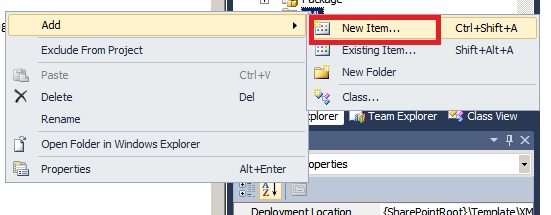
5) Select XML folder right click add > new item


6) Go to Data tab and select XML file. Give file name" fldtypes_CustomFieldTraining.xml " ,Be sure the xml file name should has to start with fldtypes only. Otherwise this will not work.


7) open the fldtypes_CustomFieldTraining.xml file and enter the below node.

<!--
This file ensures that your SPField class is displayed in the list of available field types -->
<
FieldTypes>
<FieldType>  
<Field Name="TypeName">TrainingCode</Field> 
<Field Name="ParentType">Text</Field>  
<Field Name="TypeDisplayName">Training Code</Field>  
<Field Name="TypeShortDescription">Training Code</Field>  
<Field Name="UserCreatable">TRUE</Field>  
<Field Name="FieldTypeClass">CustomFieldType.Training_CustomFieldType, $SharePoint.Project.AssemblyFullName$</Field>
</FieldType>
</FieldTypes>

8) Enter a class file and give the name : Training_CustomFieldType.cs
Please check the name correctly because this is used in xml file as FieldTypeClass.


9) put the below lines in the CS file.

using System;
using System.Collections.Generic;
using System.Linq;using System.Text;
using Microsoft.SharePoint;
namespace CustomFieldType
{

/// <summary>/// When a user creates a new column in a List or Content Type, they see a list of /// Field Types, such as "Single Line of Text" and "Date and Time". By creating your/// own Field Type, you can extend this list. You can also include your own logic in /// the new Field Type, such as custom code to set the default value or validate user/// input. This code example shows how to create a custom Field Type/// </summary>/// <remarks>/// To create a custom field type, create an empty SharePoint project and then add a /// new class. The new class should inherit from a SPField class. In this case, the /// field stores strings, so we inherit from SPFieldText. You must also create a /// fldtypes*.xml file and deploy it to TEMPLATES\XML in the 14 hive. class Training_CustomFieldType:SPFieldText{#region Constructors
//You must create both these constructors, passing the parameters to the base classpublic Training_CustomFieldType(SPFieldCollection fields, string fName):
base(fields, fName){
}

public Training_CustomFieldType(SPFieldCollection fields, string tName, string dName):
base(fields, tName, dName){
}
#endregion//Override this property to formulate a default value. public override string DefaultValue{

get{return "CP0001";}
}

//Override this method to validate string data.public override string GetValidatedString(object value){

//Check that it starts with CP for "Training Code"if (!value.ToString().StartsWith("MS")){

//When you throw an SPFieldValidationException users see red text in the UIthrow new SPFieldValidationException("Training code must start with 'MS'");}

//Check that it's 6 characters longif (value.ToString().Length != 6){

throw new SPFieldValidationException("Training code must be 6 characters long");}

//Always convert to uppercase before writing to Content DB.return value.ToString().ToUpper();}
}
}


10) Deploy the solution and check the custom field while creating column.


http://msdn.microsoft.com/en-us/library/vstudio/ee361616.aspx

Wednesday, May 1, 2013

Enabling SharePoint service URL

http://win-t6obqappc5d:9999/_admin/adminconfigservices.aspx

The url (site url /_admin/adminconfigservices.aspx ) will open the below page ,
Where you can select service to be enabled.

HTML

Script:

JS